🌐 Webhook API Server
Local REST API server — lets external tools (n8n, Make.com, Zapier, Python, cURL, AI agents...) submit image, video (Veo) and Grok generation requests over HTTP.
Webhook API requires the Max plan. Other plans cannot start the server.
Asynchronous by design: every generate request returns a
task_id immediately (HTTP 202). You poll /api/status/{task_id} until completed/failed, then download files from results. The server processes up to 10 tasks concurrently; extras wait their turn.Full technical reference (for developers / AI agents): WEBHOOK_INTEGRATION.en.md · WEBHOOK_INTEGRATION.vi.md — just hand this file to an AI for fast webhook integration.
7.1 Setup
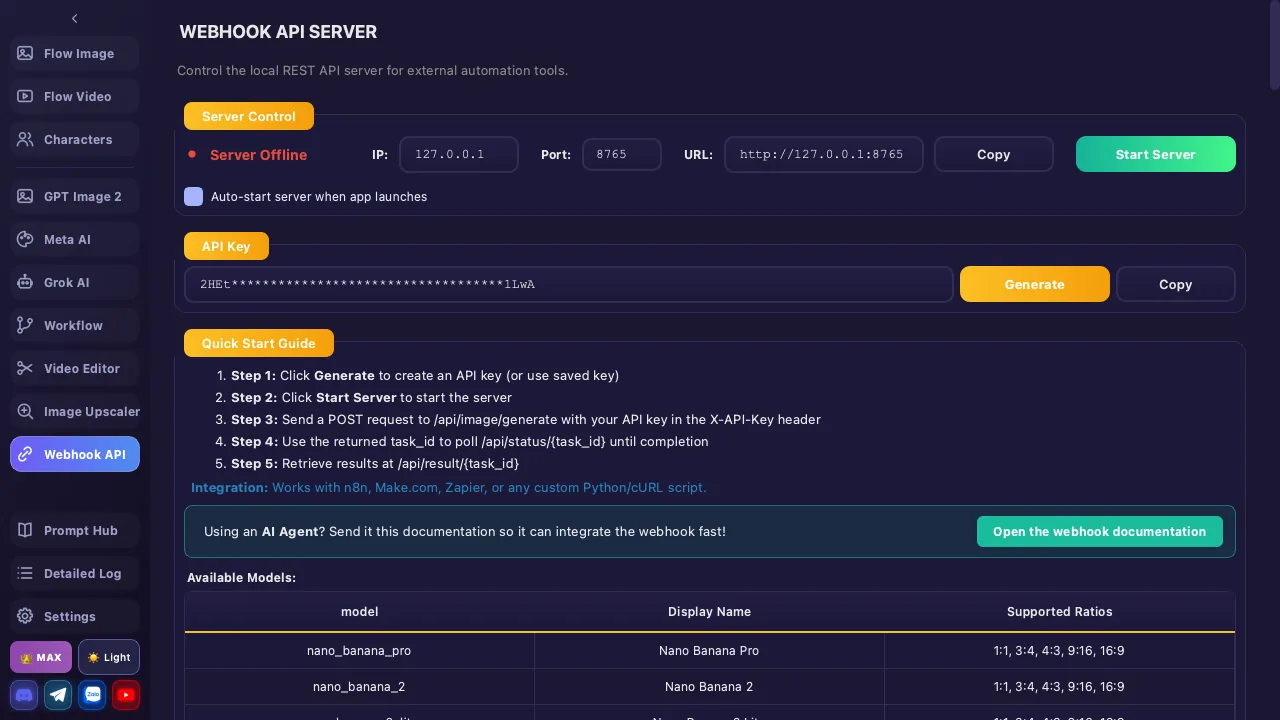
Step 1: Configure Server
| Component | Description |
|---|---|
| Status | 🔴 Offline / 🟢 Online — displayed on the interface |
| Port | Default: 8765. Range: 1024 – 65535 |
| URL | Server always runs at http://127.0.0.1:{port} — localhost only (loopback). To reach it from another machine you must add your own tunnel/reverse proxy |
CORS is enabled (
Access-Control-Allow-Origin: *) and OPTIONS preflight is handled → browser-based clients work.Step 2: Generate API Key
- Click 🔑 Generate — the app creates a random API key (32-byte URL-safe token)
- Click 📋 Copy to copy the key to clipboard
- Add the key to the
X-API-Keyheader for all requests (except/api/healthand/api/files/*)
Step 3: Start Server
- Choose a port → click ▶ Start Server
- Server runs in the background — does not affect other app features
- Click ⏹ Stop Server to shut down anytime
The API key is saved automatically — no need to regenerate each launch. Tasks are kept in memory — if you restart the app, the
task_id → result mapping is lost. Submit → poll → download within the same app session.7.2 API Endpoints
| Method | Endpoint | Auth | Description |
|---|---|---|---|
| GET | /api/health | ❌ No | Server health, uptime, pending/running task counts |
| POST | /api/image/generate | ✅ Yes | Submit an image task (Flow — Nano Banana) |
| POST | /api/video/generate | ✅ Yes | Submit a video task (Veo) |
| POST | /api/grok/generate | ✅ Yes | Submit a Grok image/video task (T2I/I2I/T2V/I2V) NEW |
| POST | /api/meta/generate | ✅ Yes | Submit a Meta AI image/video task (T2I/I2I/T2V/I2V) NEW |
| GET | /api/status/{task_id} | ✅ Yes | Check task status (pending/running/completed/failed) |
| GET | /api/result/{task_id} | ✅ Yes | Get result (only once completed) |
| GET | /api/tasks | ✅ Yes | List the 50 most recent tasks (newest first) |
| GET | /api/files/{filename} | ❌ No | Download a generated image/video file |
Trailing slashes are tolerated (e.g.
/api/health/). Missing/invalid key → 401 {"error":"Invalid or missing API key"}.7.3 Flow Image API
POST /api/image/generate
| Parameter | Type | Required | Default | Description |
|---|---|---|---|---|
| prompt | string | ✅ | — | Image description |
| model | string | ❌ | nano_banana_2 | nano_banana_pro, nano_banana_2 or nano_banana_2_lite. Unknown → nano_banana_2 |
| aspect_ratio | string | ❌ | 1:1 | 1:1, 3:4, 4:3, 9:16, 16:9 |
| reference_images | array | ❌ | [] | Up to 10 base64 images (see 7.7) |
| upscale | array | ❌ | [] | ["2K"], ["4K"] or ["2K","4K"] — 4K requires a Google Ultra account |
The image API accepts 3 Flow models:
nano_banana_2, nano_banana_pro and nano_banana_2_lite. The older models (imagen4, nano_banana Whisk) are no longer used by the webhook — passing them silently falls back to nano_banana_2 (no error).Image Model Table
| model (API) | Display Name | Supported Ratios |
|---|---|---|
nano_banana_2 | Nano Banana 2 (default) | 1:1, 3:4, 4:3, 9:16, 16:9 |
nano_banana_pro | Nano Banana Pro | 1:1, 3:4, 4:3, 9:16, 16:9 |
nano_banana_2_lite | Nano Banana 2 Lite | 1:1, 3:4, 4:3, 9:16, 16:9 |
How many files come back: no
upscale → 1 base image. With upscale → one file per requested resolution (ascending order, e.g. ["2K","4K"] → 2 files); the base image is not included. If a requested resolution cannot be produced (e.g. 4K without Ultra) → the task is failed, it does not return a smaller base image.7.4 Flow Video API (Veo)
POST /api/video/generate
| Parameter | Type | Required | Default | Description |
|---|---|---|---|---|
| prompt | string | ✅ | — | Motion / scene description |
| model | string | ❌ | veo_31_fast | See model table below |
| aspect_ratio | string | ❌ | 16:9 | 16:9 or 9:16 |
| mode | string | ❌ | text_to_video | text_to_video, start_image, start_end_image, components |
| reference_images | array | Per mode | [] | Base64 — required when mode ≠ text_to_video. Max 3 (Veo), 7 (Omni Flash, components mode) |
| resolution | array | ❌ | ["720p"] | ["720p"], ["1080p"], ["4K"] — only 4K requires Ultra (1080p does not) |
| voice | string | ❌ | "" | Lowercase voice name — used only in components mode |
| video_length | int | ❌ | 8 | Clip length (seconds). Veo: 4/6/8 (4 and 6 require Ultra). Omni Flash: 4/6/8/10 |
Video Model Table
| model (API) | Display Name | Notes |
|---|---|---|
veo_31_fast | Veo 3.1 Fast | Default |
veo_31_lite | Veo 3.1 Lite | Lightweight variant |
veo_31_quality | Veo 3.1 Quality | Highest quality |
veo_31_lite_relaxed | Veo 3.1 Lite Relaxed | Requires an Ultra account |
omni_flash | Omni Flash | components mode supports up to 7 images + voice; does not support start_end_image |
The model
veo_31_fast_relaxed is no longer valid — passing it silently becomes veo_31_fast (plain, not relaxed). An unrecognized mode behaves like text_to_video (references ignored). Omni Flash + start_end_image is rejected (no end frame yet).Video Modes (mode)
| mode | Description | reference_images |
|---|---|---|
text_to_video | Generate from prompt only | Not required |
start_image | Start image + prompt → video | 1 image (start frame) |
start_end_image | Start + end image + prompt | 2 images (start, end). Veo only |
components | Combine component images + prompt (supports voice) | Veo up to 3, Omni Flash up to 7 |
Reference order: for
start_end_image, reference_images[0] is the start frame, [1] is the end frame. For start_image only [0] is used. Video returns one file per produced resolution.7.5 Grok AI Image/Video API NEW
POST /api/grok/generate
One endpoint for all 4 Grok modes — selected via the mode parameter.
| Parameter | Type | Required | Default | Description |
|---|---|---|---|---|
| prompt | string | ✅ | — | Content description |
| mode | string | ❌ | t2v | t2i, i2i, t2v, i2v — an invalid mode fails the task |
| aspect_ratio | string | ❌ | 9:16 | 9:16, 16:9, 1:1, 2:3, 3:2 |
| reference_images | array | Per mode | [] | Up to 5 base64 images. Required (≥1) for i2i and i2v; ignored for t2i/t2v |
| video_length | int | ❌ | 6 | 6 or 10 seconds — video modes only (t2v/i2v) |
| resolution | string | ❌ | 480p | 480p or 720p — video modes only. Image modes always output 1K |
Unlike image/video, the Grok
aspect_ratio is a string and resolution is also a string (not an array). Grok always produces exactly 1 image/video per request. Grok does not support @tag image binding (see 7.7).7.6 Meta AI Image/Video API NEW
POST /api/meta/generate
One endpoint for all 4 Meta AI modes (internal backend name "vibes") — selected via the mode parameter. Reference images are passed as named slots (not the reference_images array).
| Parameter | Type | Required | Default | Description |
|---|---|---|---|---|
| prompt | string | ✅ | — | Content description |
| mode | string | ✅ | t2i | t2i, i2i, t2v, i2v — an invalid mode fails the task |
| aspect_ratio | string | ❌ | 9:16 | 9:16, 16:9, 1:1 |
| resolution | string | ❌ | 720p | 480p or 720p — video modes only (t2v/i2v). Image modes always output 1K |
| count | int | ❌ | 1 | 1–4 outputs per prompt |
| character_image | string | i2i | — | base64 — subject/character component (i2i needs ≥1 of the 3 slots) |
| scene_image | string | i2i | — | base64 — scene component (i2i) |
| style_image | string | i2i | — | base64 — style component (i2i) |
| start_image | string | i2v | — | base64 — start frame (required for i2v) |
| end_image | string | ❌ | — | base64 — end frame for interpolation (optional, i2v) |
Meta AI is the Meta AI page in the app (internal backend name "vibes", running on vibes.ai). It needs an enabled Meta account (cookie
meta_session) in the app. The Meta AI page in the app is PLUS/MAX only; the Webhook API is MAX only. Image modes (t2i/i2i) always output 1K; video modes (t2v/i2v) support 480p/720p.7.7 Reference Images & @tag Binding
Each entry of reference_images is either:
// Format 1: base64 string (data URI or raw base64) — PNG/JPG/WEBP
"reference_images": ["data:image/png;base64,iVBOR..."]

// Format 2: object — with category and/or name
"reference_images": [
  {"data": "data:image/png;base64,...", "category": "subject", "name": "red_car.png"},
  {"data": "data:image/jpeg;base64,...", "name": "house.jpg"}
]category(optional):subject/scene/style— accepted but ignored for Flow image models (single generic reference slot)name(orfilename, optional): the image's original filename → lets you bind it into the prompt with@tag- Max count: image = 10, grok = 5, video = 3 (Omni Flash components = 7). Extra entries are ignored
Binding images by name with @tag
When a reference image has a name, you point at it inside the prompt with @<keyword> — the same mechanism as the Image / Veo pages in the app.
- Matching:
<keyword>is a case-insensitive substring of the filename (without extension). E.g.name: "red_car.png"→@red_car,@car,@redall hit; the first image in order wins - Scope: works for image (Flow) and video (Veo); Grok does NOT support
@tag - Unmatched tags stay as literal text — they never cause an error
{
  "prompt": "a @red_car parked next to a @house at night",
  "reference_images": [
    {"data": "data:image/png;base64,...", "name": "red_car.png"},
    {"data": "data:image/jpeg;base64,...", "name": "house.jpg"}
  ]
}
7.8 Response & Status
Successful submission (202 Accepted)
{
  "task_id": "abc12345",
  "status": "pending",
  "message": "Image task queued for processing",
  "poll_url": "/api/status/abc12345"
}
Check status: GET /api/status/{task_id}
| Status | Meaning |
|---|---|
pending | Received, waiting to be processed |
running | Generating image/video |
completed | Done — file download URLs in results |
failed | Failed — see error_code, error, error_detail |
When completed
{
  "task_id": "abc12345",
  "type": "image",
  "status": "completed",
  "prompt": "a cat ...",
  "created_at": 1707782400.0,
  "results": ["http://127.0.0.1:8765/api/files/image_001.png"],
  "completed_at": 1707782460.0
}
When failed
{
  "task_id": "abc12345",
  "type": "image",
  "status": "failed",
  "error_code": 429,
  "error": "Daily image quota exhausted (user@gmail.com)",
  "error_detail": "429: Daily image quota exhausted (user@gmail.com)"
}
Error code table (error_code)
| error_code | Meaning | Typical error |
|---|---|---|
429 | Daily quota reached / rate limited → back off, rotate accounts, retry later | quota message (account email included) |
403 | Permission denied / session issue | PERMISSION_DENIED |
400 | Invalid request / prompt policy violation | INVALID_ARGUMENT |
500 | Upstream (Google/xAI) server error | INTERNAL / HTTP_500 |
0 | Validation / environment error | No active accounts available, Missing required field: prompt, invalid Grok mode, upscale failed, timeout... |
For programmatic handling, branch on
error_code (language-independent). error_code == 429 is the signal to back off / rotate accounts / retry later.7.9 Usage Examples
Example 1: Generate image with cURL
# 1. Submit image generation request
curl -X POST http://127.0.0.1:8765/api/image/generate \
  -H "Content-Type: application/json" \
  -H "X-API-Key: YOUR_API_KEY" \
  -d '{"prompt": "a golden retriever on a beach at sunset", "model": "nano_banana_2", "aspect_ratio": "16:9"}'

# → {"task_id":"abc12345","status":"pending","poll_url":"/api/status/abc12345"}

# 2. Poll until completed
curl http://127.0.0.1:8765/api/status/abc12345 -H "X-API-Key: YOUR_API_KEY"

# 3. Download result (no API key needed)
curl -O http://127.0.0.1:8765/api/files/image_001.png
Example 2: Python (submit → poll → download)
import time, requests

BASE = "http://127.0.0.1:8765"
H = {"X-API-Key": "YOUR_API_KEY", "Content-Type": "application/json"}

# Submit
resp = requests.post(f"{BASE}/api/image/generate", json={
    "prompt": "cyberpunk city at night, neon lights",
    "model": "nano_banana_pro",
    "aspect_ratio": "16:9",
    "upscale": ["2K"]
}, headers=H)
task_id = resp.json()["task_id"]

# Poll until done
while True:
    s = requests.get(f"{BASE}/api/status/{task_id}", headers=H).json()
    if s["status"] == "completed":
        for url in s["results"]:
            data = requests.get(url).content   # /api/files needs no key
            open(url.split("/")[-1], "wb").write(data)
        break
    if s["status"] == "failed":
        print(f"[{s['error_code']}] {s['error']}")
        break
    time.sleep(4)
Example 3: Video (start image) + Grok (image-to-video)
# Veo — start image + prompt, 1080p
curl -X POST http://127.0.0.1:8765/api/video/generate \
  -H "Content-Type: application/json" -H "X-API-Key: YOUR_API_KEY" \
  -d '{"prompt":"flowing water, cinematic","mode":"start_image","reference_images":["data:image/png;base64,..."],"resolution":["1080p"]}'

# Grok — image-to-video, 720p, 6 seconds
curl -X POST http://127.0.0.1:8765/api/grok/generate \
  -H "Content-Type: application/json" -H "X-API-Key: YOUR_API_KEY" \
  -d '{"prompt":"make it rain over the city","mode":"i2v","aspect_ratio":"16:9","resolution":"720p","reference_images":["data:image/png;base64,..."]}'
7.10 Request Log
All requests are logged in the Request Log table on the interface — including time, endpoint, status code, task ID, and source IP.
The server has a watchdog: any task stuck in
running for more than 15 minutes is automatically marked failed.