🎬 Veo Video
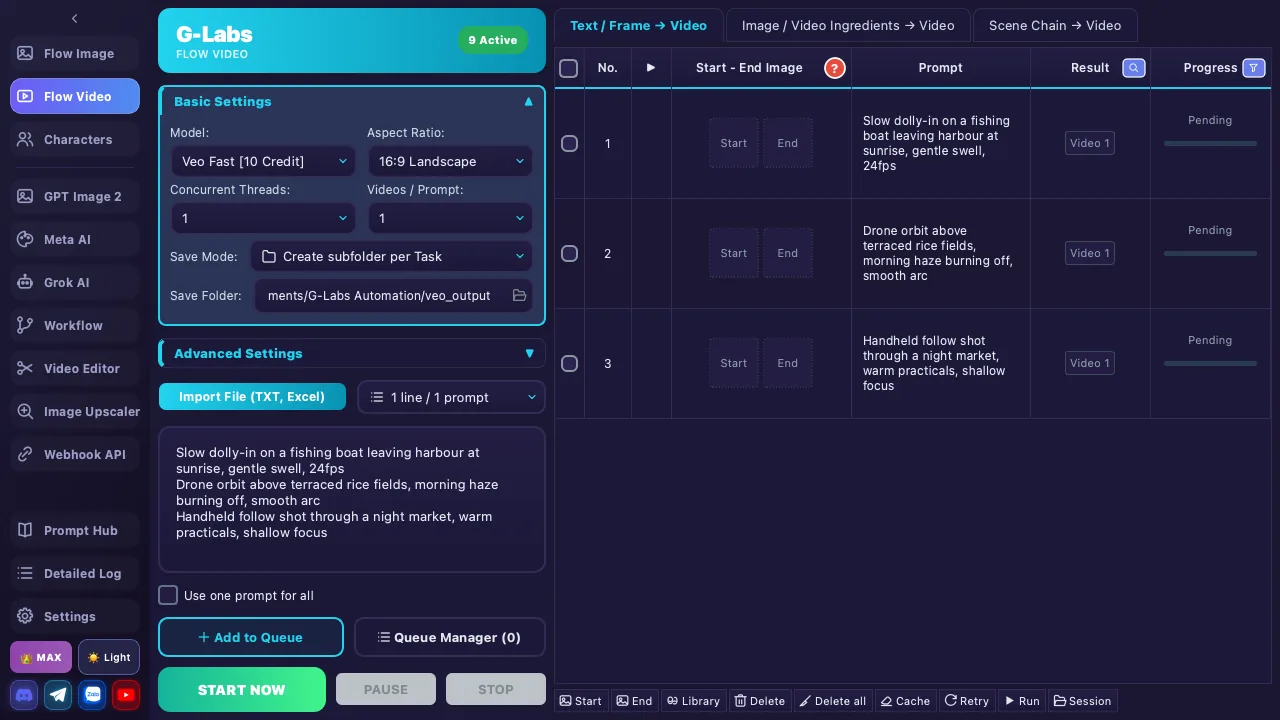
Batch AI video generation using Google Veo — 5 models, 5 image pairing modes, component-based video, and sequential scene building. (Grok has its own section — see Grok AI; Meta AI — see Meta AI)
Google Gemini accounts of any tier (FREE, PRO, ULTRA) can create videos (costs credits). Some advanced features (Veo 4s/6s durations, 4K resolution) additionally require an ULTRA account.
5.1 Video Models
| Model | Credits | Description |
|---|---|---|
| Omni Flash [12 Credit] | 12 | New model — combine up to 7 component images, supports 10-second video. Does not support an end frame (start_end_image) |
| Veo Lite [5 Credit] | 5 | Lightweight, credit-saving variant |
| Veo Fast [10 Credit] | 10 | Fast, normal priority (default) |
| Veo Quality [100 Credit] | 100 | Highest quality — does not support Tab 2 (component compose) or Tab 3 (Scene Builder) |
| Veo Lower [0 Credit] | 0 | Low priority (relaxed), 0 credits |
Credit costs are shown live in the app and may change over time — for the most accurate values check directly in the app. Veo 4s/6s durations and 4K resolution require a Google Ultra account (Omni Flash is exempt from the Ultra requirement for 4s/6s; only Omni Flash offers 10 seconds).
Generation modes: Text-to-Video (text only), Start image + prompt, Start + End image + prompt, Component compose (Tab 2)
5.2 Configuration Panel
| Setting | Details | Note |
|---|---|---|
| Model | Omni Flash, Veo Lite, Veo Fast (default), Veo Quality, Veo Lower | Loaded from server; order Omni Flash → Lite → Fast → Quality → Lower |
| Resolution | Checkboxes: 720p (original), 1080p, 4K — select multiple simultaneously | 1080p/4K: Plus/Max. Each video gets additional upscaled versions |
| Aspect Ratio | 16:9 Landscape / 9:16 Portrait | |
| Videos/Prompt | 1 to 4 | Basic: 1 only |
| Threads | 1 account supports usually 10 threads (subject to server load), multiple accounts rotate round-robin | Basic: 1 / Plus: 10 / Max: unlimited * |
| Delay | Min - Max (seconds), range 1-300 | Default 10-20 seconds |
| Pair Mode | 5 modes (see section 5.3) | Only visible on Tab 1 |
| Seed | 6-digit number (100000-999999) + lock checkbox | Reproduce identical results. Auto-locks when seed is entered |
| Import Prompts | Import button — supports TXT, Excel (.xlsx/.xls) | Drag & drop files onto prompt area or Import button |
| Parse Mode | Newline (1 line/prompt) or Paragraph (blank line separates prompts) | Paragraph for multi-line prompts |
| Use one prompt for all | Checkbox — applies the first prompt to all rows | Only visible on Tab 1 |
| Reference Folder | Path to reference image folder | Supports drag & drop. Hidden on Tab 3 |
| Save Folder | Video output directory | Supports drag & drop |
5.3 Image Pair Modes (Tab 1)
| Mode | Description |
|---|---|
| Default | 1:1 pairing — each start image paired with its corresponding end image |
| 1 Start - Multiple End | 1 start image → N end images (Plus/Max) |
| Multiple Start - 1 End | N start images → 1 end image (Plus/Max) |
| Sequential Chain (1:2 → 2:3...) | Continuous chain: end image N = start image N+1. Auto-loads all images from reference folder (Plus/Max) |
| Pair Double (1:2 → 3:4...) | Pair by twos: images 1+2, images 3+4, ... Auto-loads all images from reference folder (Plus/Max) |
Advanced modes (mode 2+) require Plus or Max plan. Sequential Chain and Pair Double modes automatically load all images from the reference folder.
5.4 Toolbar
Tab 1: Text/Image to Video
| Button | Function |
|---|---|
| 🖼️ Start Image | Load images to Start column — select files or folder. Option: add images for all prompts |
| 🖼️ End Image | Load images to End column — select files or folder |
| 🗑️ Delete | Delete selected rows (checked) |
| 🧹 Clear All | Clear the entire table |
| 🔄 Retry Errors | Re-run all rows with error status |
| ▶️ Run Selected | Run only the checked rows |
| 📂 Load Session | Open previous session from auto-backup |
Tab 2: Component Video
| Button | Function |
|---|---|
| 🖼️ Add Components | Load component images into the table — select folder or files |
| 🗑️ / 🧹 / 🔄 / ▶️ / 📂 | Same as Tab 1 |
5.5 Action Buttons
| Button | Function |
|---|---|
| 🚀 START | Begin video generation. If queue has tasks, runs them sequentially |
| ⏸ PAUSE | Pause, preserving progress |
| ⏹ STOP | Stop completely |
5.6 Tab 2: Component-based Video ⭐ (Plus/Max)
Combines 3 component images (subject, scene, style) into video. Supports auto-match keywords from reference folder.
- Load images from component folder — auto-distributes into slots
- Each table row has 3 image slots + prompt + video result
- Not supported with Quality [100 Credit] model
5.7 Tab 3: Scene Builder 🎞️ (Plus/Max)
Creates a sequential video chain — the last frame of video N automatically becomes the start image for video N+1. Produces long, smooth videos with natural scene transitions.
| Feature | Details |
|---|---|
| Threads | Sequential processing, 1 thread only (cannot change) |
| Videos/Prompt | Fixed at 1 (cannot change) |
| Resolution | 720p, 1080p, 4K — independent checkboxes |
| Reference images | Auto: only first video has reference images, subsequent videos use the last frame of the previous video |
| Hidden | Threads, videos/prompt, delay, reference folder, seed lock |
5.8 Queue & Backup
- ➕ Add to Queue: Save entire current configuration (model, prompts, references, resolution, etc.) as a task
- 📋 Queue Manager: Open management dialog — rename, skip, retry, delete, edit individual tasks
- Task limits: Basic: 1 / Plus: 10 / Max: unlimited
- Auto backup after every change (keeps up to 10 files, 1 file per app session)
- 📂 Load Session: Restore prompts + references + results from a previous session
- 📥 Recovery Downloads: Appears when videos were generated successfully but failed to download — click to recover
- Last-used settings (model, ratio, folders) auto-saved when reopening the app
Plan Restrictions
| Feature | Basic | Plus | Max |
|---|---|---|---|
| Tab 1 (Text-to-Video / Image-to-Video) | ✅ | ✅ | ✅ |
| Tab 2 (Component-based Video) | ❌ | ✅ | ✅ |
| Tab 3 (Scene Builder) | ❌ | ✅ | ✅ |
| Videos/Prompt | 1 | 1-4 | 1-4 |
| Concurrent Threads | 1 | 10 | Unlimited * |
| Queue Tasks | 1 | 10 | Unlimited |
| 1080p / 4K Resolution | ❌ | ✅ | ✅ |
| Advanced Pair Modes | ❌ | ✅ | ✅ |
| Prompt Limit | 10 | Unlimited | Unlimited |
* Threads: Each Gemini account usually = 10 concurrent threads (subject to server load). Plus caps at 10 total, Max is unlimited.