🔍 Image Upscaler
A dedicated page to upscale images in batches right on your own machine — no account, no credits, no internet needed.
Overview
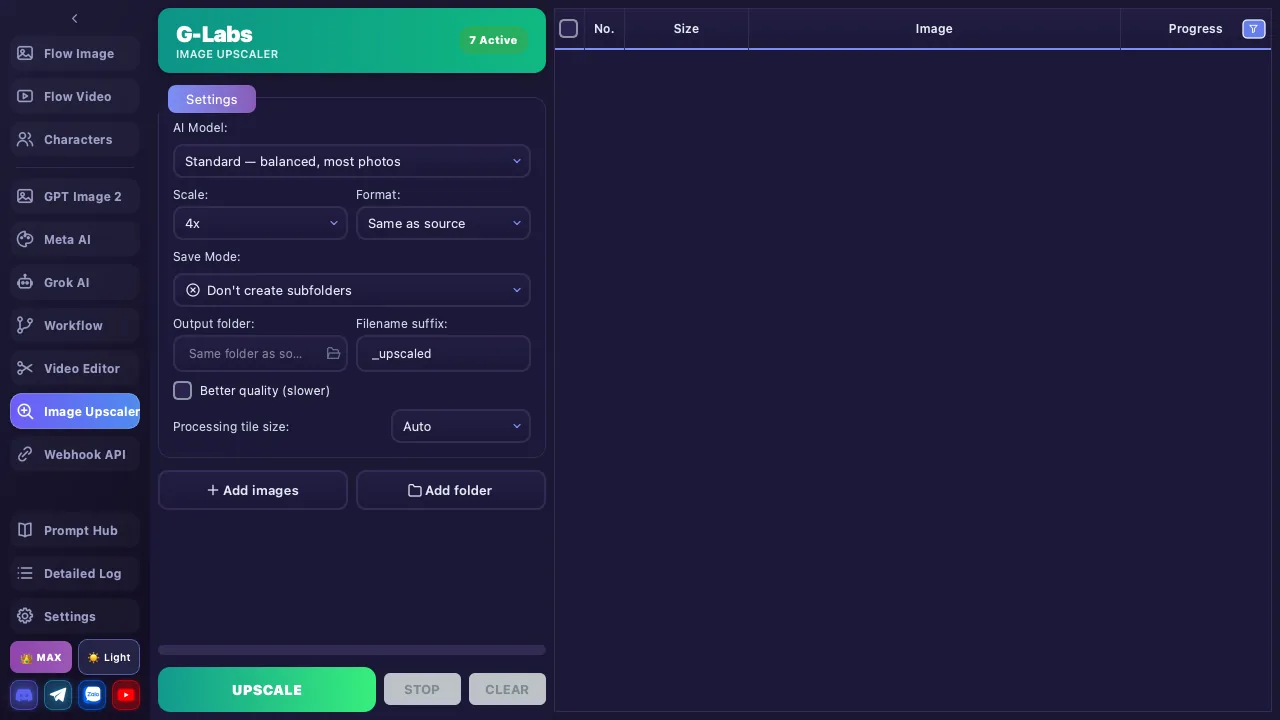
Image Upscaler is a standalone sidebar page (🔍 icon). It uses the bundled realesrgan-ncnn-vulkan engine to enlarge & sharpen images fully locally (offline).
Completely free — works on every plan (including Basic), no credits, no account required. This page is NOT tier-gated.
100% local: NO G-Labs/Google account, NO credits, no internet required. Works on any images (your own or downloaded), not just app-generated ones.
Do not confuse this with the "Image upscale (2K/4K)" option inside the Flow Image / Video creation pages and the plan comparison table — that one is the Flow online upscale and needs a Google ULTRA account + credits. This Image Upscaler page is 100% local & free.
Upscale Models (7 models)
A model-count badge shows in the top-right when the engine is ready. Each model is tuned for a different kind of image:
| Model | Best for |
|---|---|
| Standard | Balanced — most photos |
| Lite & fast | Faster, less detail |
| Digital art | Drawings, anime, CGI |
| High fidelity | Keep fine detail |
| Realistic & sharp (Remacri) | Sharp, rich textures |
| Balanced (Ultramix) | Balanced sharpness |
| Ultra sharp | Maximum sharpness |
All models are 4×-base models for high-resolution output. You still pick an output scale of 2×–8× in the Scale box; 4×/8× outputs can be very large and the engine still produces them.
Configuration
| Setting | Details |
|---|---|
| AI Model | Pick one of the 7 models above |
| Scale | 2× / 3× / 4× / 5× / 6× / 7× / 8× |
| Format | Same as source / PNG / JPG / WEBP |
| Output folder | Leave empty = save to the same folder as the source |
| Advanced | Processing tile size (Auto), "Better quality (slower)", GPU id |
If your machine has no Vulkan-capable GPU, the app reports "No Vulkan GPU" — the engine needs Vulkan to run.
How to Use
- Load images: drag-and-drop images or a whole folder into the table, or use ➕ Add images / 📁 Add folder
- Choose settings: model + scale + format + output folder
- Click 🚀 Upscale — batch processing; each row has 5 statuses: Waiting / Processing / Done / Error / Stopped
- Review: Compare before/after with a slider (drag the divider, scroll to zoom), Open the output folder, or Retry individual rows
Since it runs locally, speed depends on your GPU. Large images at high scale (8×) take more time and RAM.